Picture a sales rep finishing a client meeting in the car park. Instead of typing notes into a phone, she just talks. “Log this as a follow-up, set a callback for Thursday, and mark the deal as stage two.” The CRM updates before she pulls out of the parking lot. That is what AI voice assistant CRM integration looks like when it works well, and it is no longer a thing only big enterprises can afford to build.
Voice has quietly become one of the most natural ways to interact with software. People dictate messages, ask their phones for directions, and talk to speakers at home without thinking twice. Bringing that same comfort into your CRM removes the friction that stops reps from keeping records clean. In this guide we will walk through how the integration actually works, then go platform by platform through Salesforce, HubSpot, Odoo and Dynamics 365.
Why connect a voice assistant to your CRM at all
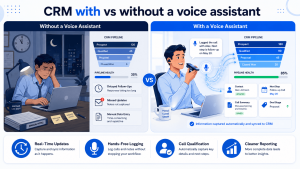
The honest answer is that most CRM data is incomplete because logging it is annoying. Reps are busy. They forget. They batch updates at the end of the week and half the detail is gone by then. A voice layer fixes the most expensive part of that problem, which is data entry friction.
When people can speak to the system, a few things change quickly:
- Records get updated in the moment, so your pipeline reflects reality instead of last Tuesday.
- Hands-free use means field teams, drivers and warehouse staff can log activity without stopping work.
- Inbound calls can be answered, qualified and routed by a voice agent before a human ever picks up.
- Managers get cleaner reporting because the gaps in manual entry shrink.
None of this requires ripping out your existing setup. A good AI voice assistant CRM integration sits on top of what you already run and talks to it through its API.
What is actually happening under the hood
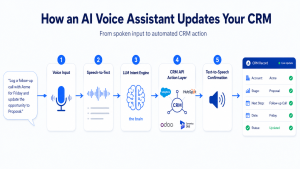
Before the steps, it helps to see the moving parts. A voice assistant is not one piece of technology. It is a short chain of them passing information along, and the CRM is the last link.
Here is the flow in plain terms. The person speaks. A speech-to-text engine turns that audio into words. A language model reads those words and works out what the person wants, which is usually called intent. That intent maps to an action, like create a lead or update a deal stage. The system then calls your CRM through its API to make the change. Finally, a text-to-speech engine speaks a confirmation back.
The clever part sits in the middle. Modern setups use a large language model to handle the messy way people actually talk. Someone might say “bump the Henderson deal to closed won and remind me to invoice them next week,” and the model has to split that into two separate CRM actions. Getting that mapping right is where most of the engineering effort goes.
The general integration framework
Every platform has its own quirks, but the build process rhymes across all of them. If you understand these six steps, the platform-specific sections will make a lot more sense.
- Define the use cases first. Decide whether you are logging calls, updating deals, booking appointments or answering inbound queries. Narrow beats broad at the start.
- Pick your voice stack. Choose your speech-to-text, language model and text-to-speech providers. Many teams use a single platform that bundles all three.
- Connect to the CRM API. Authenticate, set permissions, and confirm which objects the assistant is allowed to read and write.
- Map intents to actions. This is the rulebook that turns “create a lead for Acme” into a real API call with the right fields filled in.
- Add guardrails. Build in confirmations for risky actions, handle the cases where the assistant mishears, and log everything for review.
- Test with real voices. Accents, background noise and half-finished sentences will break a system that only got tested in a quiet room. Pilot with a small team before rolling out.
Keep that sequence in mind. Now let us look at how it plays out on each of the four platforms.
AI voice assistant CRM integration with Salesforce
Salesforce is the most mature of the four when it comes to voice. It has a deep API surface and a native AI layer, so you are rarely fighting the platform.
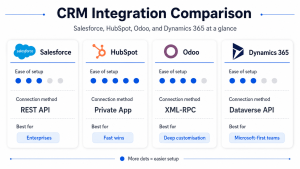
The cleanest route uses the Salesforce REST API together with its AI tooling. You authenticate through a connected app using OAuth, then your voice layer writes to standard objects like Lead, Contact, Opportunity and Task. If you are on the right edition, the built-in AI features can handle a lot of the intent work for you, which cuts down on custom code.
For inbound calls, Salesforce plays nicely with telephony through its open CTI framework, so a voice agent can answer, look up the caller, and surface their record before transferring to a human. For outbound logging, a rep simply speaks and the assistant drops a structured activity onto the right record.
One word of caution. Salesforce permissions are granular, and it is easy to give a voice assistant either too much or too little access. Map the field-level security carefully before you go live.
AI voice assistant CRM integration with HubSpot
HubSpot is the friendliest platform for teams that want results without a heavy engineering lift. Its API is clean, well documented and forgiving, which makes it a great place to prototype a voice workflow.
You connect through a private app, generate an access token, and then your assistant can create and update contacts, deals, tickets and engagements. HubSpot calls logged activities ‘engagements,’ and that object is exactly where most voice-logged notes and call summaries should land.
A common pattern here is the post-call summary. A rep finishes a call, speaks a quick recap, and the assistant writes a tidy note plus a follow-up task against the deal. Because HubSpot workflows can trigger off new engagements, that single voice action can kick off an entire automated sequence, like sending a follow-up email or alerting a manager.
If your team lives in HubSpot and you want a fast win, this is usually where I would start. The barrier to a working prototype is genuinely low.
AI voice assistant CRM integration with Odoo
Odoo is the most flexible of the four, mostly because it is open source. You are not limited to whatever the vendor decided to expose. If you can imagine the workflow, you can usually build it.
Integration runs through the Odoo external API, which speaks XML-RPC and JSON-RPC. Your voice layer authenticates, then reads and writes directly to models like crm.lead, res.partner and calendar.event. Because Odoo modules are customisable, you can even create a dedicated voice-logging model that captures exactly the fields your business cares about.
This flexibility is the reason a lot of mid-sized companies pick Odoo for voice work. You can tie the assistant into not just the CRM but the wider ERP, so a single spoken instruction can update a sales lead and trigger an inventory check at the same time. That kind of cross-module action is harder to pull off on closed platforms.
The trade-off is that flexibility needs expertise. A clean Odoo voice integration depends on someone who knows the data model well, otherwise you end up writing to the wrong place. This is the part where teams usually bring in an experienced Odoo implementation partner.
AI voice assistant CRM integration with Microsoft Dynamics 365
Dynamics 365 makes the most sense for organisations already deep in the Microsoft ecosystem. If your team runs on Teams, Outlook and Azure, the pieces fit together with very little glue.
Integration happens through the Dataverse Web API, with authentication handled by Microsoft Entra ID. Your assistant reads and writes to tables like account, contact, lead and opportunity. The real advantage shows up when you bring in Azure AI services for speech and language, because they are built to talk to Dynamics out of the box.
Voice agents inside Teams are a natural fit here. A sales manager can ask, during a call, for the latest numbers on an account and hear them read back without leaving the meeting. For inbound work, the same Azure speech layer can power a phone agent that creates cases or leads automatically.
The thing to watch with Dynamics is licensing and the layers of the Power Platform. The capability is excellent, but the setup has more moving parts than HubSpot, so plan for a longer configuration phase.
Where these projects usually go wrong
Most failed voice projects do not fail on the technology. They fail on the details around it. A few patterns come up again and again.
- Skipping confirmations. If the assistant can delete or overwrite records without checking, one misheard word can do real damage. Always confirm destructive actions.
- Testing in a silent room. Real users talk in cars, warehouses and noisy offices. Test where the tool will actually live.
- Trying to do everything on day one. Voice assistants that try to handle every workflow at launch tend to handle all of them badly. Ship one solid use case, then expand.
- Ignoring data privacy. Voice recordings and transcripts are sensitive. Decide early how you store them and which regulations apply to your industry and region.
Get these right and the build becomes far less risky. Most of the value comes from picking a narrow use case, nailing it, and growing from there.
Getting it built without the headaches
You can absolutely build a voice integration in-house if you have the engineering bandwidth. Many teams prefer a partner who has already made the mistakes on someone else’s project, though, because it shortens the path to something that works in production.
At Appther we build AI voice agents and custom AI systems that plug into the CRM you already run. If you want to see what a voice agent looks like in a live, regulated setting, our healthcare voice agent case study is a good place to start. And if your stack runs on Odoo, our AI-enhanced ERP work shows how voice fits into the wider system, not just the CRM.
Frequently asked questions
How long does an AI voice assistant CRM integration take to build?
A focused first version, covering one or two use cases on a single CRM, usually takes four to eight weeks. A broader rollout across multiple workflows and teams takes longer. The biggest variable is how clean your CRM data and permissions already are.
Do I need to replace my current CRM to add a voice assistant?
No. A voice assistant sits on top of your existing CRM and talks to it through the API. Salesforce, HubSpot, Odoo and Dynamics 365 all expose the access needed, so you keep your current setup and add a voice layer over it.
Which CRM is easiest to integrate a voice assistant with?
HubSpot tends to be the quickest for a first prototype because its API is simple and well documented. Salesforce and Dynamics 365 are more powerful but need more configuration. Odoo is the most flexible, which is great if you have the expertise to use it.
Is voice data secure when it connects to a CRM?
It can be, but security is a design choice, not a default. You need to decide how recordings and transcripts are stored, encrypt data in transit and at rest, and follow the regulations for your industry, whether that is GDPR, HIPAA or something regional. Build these rules in from the start rather than bolting them on later.
Can the voice assistant answer inbound calls, not just log them?
Yes. With a telephony connection, a voice agent can answer calls, identify the caller, qualify the enquiry and create or update records automatically. It can handle routine calls end to end and pass anything complex to a human with the context already filled in.
The short version
AI voice assistant CRM integration is no longer experimental. The pieces are mature, the APIs are open, and the payoff is cleaner data with far less manual entry. Whether you run Salesforce, HubSpot, Odoo or Dynamics 365, the path is similar: pick one use case, connect through the API, map your intents carefully, and test with real voices before you scale.
Start small, prove the value, then expand. If you want a hand turning this into something live, talk to the team at Appther and we will map out what makes sense for your stack.