Odoo 19 arrived in September 2025, and it has changed how businesses think about their ERP. The new version puts AI at the center of daily work, speeds up the interface, and adds fresh modules that simply did not exist before. So if you run Odoo 17 today, you are probably asking one question. Is it time to move?
This guide answers that question in full. We will cover what an Odoo 17 to Odoo 19 migration really involves, how the process works step by step, what it costs, how long it takes, and how to avoid the mistakes that turn a smooth upgrade into a painful one. By the end, you will know exactly what to expect and how to plan it.
If you want a feature by feature breakdown first, our earlier post on Odoo 19 vs Odoo 17 explains what changed. This guide picks up where that one leaves off and focuses on the move itself.
Should You Migrate to Odoo 19?
Let us start with the honest answer. Not every business needs to migrate the moment a new version lands. However, Odoo 19 is a substantial release, not a minor patch. The gap between Odoo 17 and Odoo 19 is wide enough that most growing businesses will benefit from the move within the next year.
You should seriously consider migrating if any of these apply to you:
- Your team wants the new AI tools, such as Ask AI search and AI agents that read your documents.
- Your current system feels slow when many users log in at once.
- You need newer apps or modules that Odoo 17 does not offer.
- You want to stay on a supported version with the latest security patches.
On the other hand, if your Odoo 17 setup is heavily customized and running smoothly, you can plan the move carefully rather than rush it. Either way, doing it properly matters far more than doing it fast.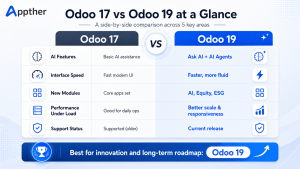
Migration Is Not the Same as an Update
First, a key point that saves a lot of confusion. A migration is not the same thing as clicking update.
An update applies small fixes within the same version. A migration moves your entire system, including your data, your settings, and your custom code, from one major version to another. Because Odoo 19 changed parts of its underlying framework, your Odoo 17 customizations will not always work as they are. They need review and, in some cases, a rebuild.
This is why a migration needs planning. Skip the planning and you risk broken workflows, missing data, or downtime your team cannot afford. Plan it well and your users barely notice the switch happened over a weekend.
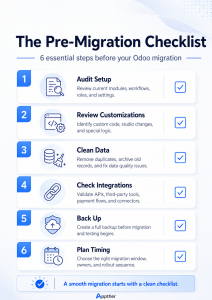
The Pre-Migration Checklist
Good migrations win or lose before any data moves. So before you touch a single record, work through this checklist.
- Audit your current setup. List every module you use, every custom module, and every third-party integration. You cannot migrate what you have not mapped.
- Review your customizations. Mark which custom features are essential, which are nice to have, and which nobody actually uses anymore. A migration is a great chance to drop dead weight.
- Clean your data. Remove duplicates, fix broken records, and archive what you no longer need. Migrating messy data just gives you messy data in a newer version.
- Check your integrations. Confirm that the tools connected to Odoo, such as your payment gateway or e-commerce store, support the new version.
- Back up everything. Take a full, tested backup of your Odoo 17 database before anything begins. This is your safety net.
- Plan the timing. Pick a low-traffic window for the final cutover, such as a weekend or a quiet period in your business calendar.
The Odoo 17 to Odoo 19 Migration Process, Step by Step
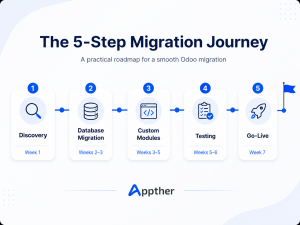
Now to the heart of it. A well run migration follows a clear sequence. Here is how the process usually unfolds.
Step 1: Discovery and Planning
First, your team or your partner studies your current system in detail. They document your modules, data volume, and customizations. Then they produce a migration plan with a timeline, a risk list, and a fixed scope. This stage prevents nasty surprises later.
Step 2: Database Migration
Next, your Odoo 17 database is upgraded to the Odoo 19 structure. This happens on a separate test server, never on your live system. Odoo provides migration tooling for this, but the data still needs careful mapping and validation to land correctly in the new version.
Step 3: Custom Module Migration
After that, your custom modules are reviewed against the Odoo 19 framework. Some need only small tweaks. Others need rebuilding. Either way, each module is updated, tested, and confirmed to work before it goes near production.
Step 4: Testing and Validation
Then comes the part you must never skip. Your team tests every important workflow on the new system. They check reports, run transactions, and confirm that data matches the old system exactly. Running both versions in parallel for a short time helps catch anything that slipped through.
Step 5: Training and Go-Live
Finally, you train your team on the new features, especially the AI tools and updated screens. Once everyone signs off, you switch over during your chosen low-traffic window. A close monitoring period right after go-live, often called hypercare, catches any small issues fast.
Handling Your Custom Modules
For most businesses, custom modules are the trickiest part of the move. So they deserve their own section.
Odoo 19 updated parts of its framework, including how some views and components are built. As a result, custom code written for Odoo 17 may not run without changes. The good news is that clean, well written modules usually migrate with modest effort. Messy or undocumented ones take longer.
This is exactly why the pre-migration audit matters. When you know which modules are essential, you avoid spending money rebuilding features nobody uses. A certified Odoo team will review each module, estimate the effort, and tell you honestly which ones are worth carrying forward.
Data Migration Done the Right Way
Your data is the most valuable thing in your ERP. Lose it, and the whole project fails. So data migration follows a careful, repeatable method.
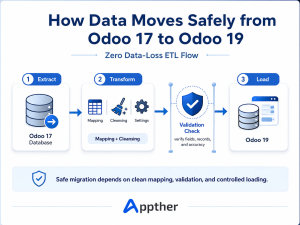
Specialists call it ETL, which stands for extract, transform, and load. In plain terms, your data is pulled from Odoo 17, reshaped to fit the Odoo 19 structure, then loaded and checked for accuracy. Validation is the key word here. Every record count, every total, and every key field gets compared against the original before anyone trusts the new system.
A proper process guarantees zero data loss. That is the standard you should expect, and nothing less.
Common Migration Challenges and How to Avoid Them
Even good projects hit bumps. Knowing them in advance keeps yours on track.
- Underestimating custom code. Teams often assume modules will just work. Plan a real audit and budget for rebuilds.
- Skipping testing. Rushing to go-live without full testing is the top cause of post-migration pain. Always test against real business scenarios.
- Forgetting user training. Odoo 19 looks and behaves differently. Untrained users get frustrated and adoption drops. Train before, not after.
- Migrating on the live server. Always work on a test environment first. Your production system stays untouched until the final cutover.
- Poor timing. Going live during your busiest week invites disaster. Choose a quiet window and have a rollback plan ready.
How Long Does Migration Take, and What Does It Cost?
These are the two questions every business owner asks first. The honest answer is that it depends on your setup. Still, here are realistic ranges for 2026.
A standard migration for a small or mid-size business usually takes four to eight weeks. Complex enterprise projects with many custom modules and large data volumes can run three to six months. The biggest factors are the number of customizations, your data volume, and your integrations.
Cost follows the same logic. A clean setup with few customizations costs far less than a heavily tailored system. The only way to get a real number is a proper system audit. For a wider view of ERP budgets, including implementation and ongoing support, see our Odoo services overview, which lays out how projects are scoped and priced.
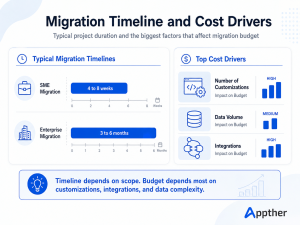
| INFOGRAPHIC PLACEHOLDER Migration Timeline and Cost Drivers A two-part visual. Left: a bar showing typical timelines (SME 4 to 8 weeks, Enterprise 3 to 6 months). Right: three cost-driver icons (number of customizations, data volume, integrations) sized to show their impact on budget. |
Why a Certified Odoo Partner Matters
You can attempt a migration in-house. Many businesses do, and some succeed. But the projects that go smoothly almost always share one thing. They are handled by people who have done it many times before.
Appther is a certified Odoo 19 partner with more than 500 projects delivered across over 40 countries. The team works across Odoo 17, 18, and 19, in both Community and Enterprise editions. That means your migration is planned by people who already know where Odoo 19 differs and how to handle custom code cleanly.
Appther also offers something most agencies do not. The team can make your Odoo 19 system smarter during the move, adding AI features built natively inside Odoo such as predictive forecasting, invoice scanning, and an AI sales copilot. You can explore the full range on the Odoo services page, or look through the portfolio to see the quality of delivered work.
Frequently Asked Questions
Is Odoo 19 worth upgrading to from Odoo 17?
For most businesses, yes. Odoo 19 brings AI-driven automation, faster performance, and new modules that Odoo 17 lacks. Companies handling high volumes or many users gain the most. If your Odoo 17 system runs well, you can plan the move carefully rather than rush it.
Will my custom Odoo 17 modules work in Odoo 19?
Not automatically. Odoo 19 changed parts of its framework, so custom modules need review. Some migrate with minor adjustments. Others may need rebuilding. A full module audit before the project tells you exactly what to expect.
How long does an Odoo 17 to Odoo 19 migration take?
A standard small or mid-size migration usually takes four to eight weeks. Complex enterprise projects with heavy customization and large data sets can run three to six months. A system audit gives you a precise timeline.
Can I migrate without losing any data?
Yes. A proper migration uses a structured extract, transform, and load process with full validation. Every record is checked against the original before go-live. Zero data loss is the standard you should expect from any serious partner.
Will my business face downtime during migration?
It should not. The work happens on a test server while your live system keeps running. The only switch comes during a planned low-traffic window, often a weekend, with a rollback plan in place just in case.
Final Thoughts
Migrating from Odoo 17 to Odoo 19 is a smart move for most growing businesses in 2026. The new version is faster, smarter, and built for the way teams work now. The key is to treat the move as a planned project, not a quick click of update.
Audit your setup, clean your data, test everything, and train your team. Do those things, and the switch feels almost effortless.

Ready to plan your move? Book a free consultation with Appther. The team will audit your current Odoo 17 system, map your custom modules, and give you a clear, fixed-price plan with a realistic timeline. No pressure, no jargon, just an honest path to Odoo 19.